Windows.edb vs Windows.db: Windows 10 vs 11 Search Index
How the Windows Search index moved from the ESE Windows.edb of Windows 10 to the SQLite Windows.db of Windows 11: tables, layout, WAL and DFIR impact.
TL;DR. Same data model, different container. Windows 10 and earlier store the index in one ESE file, Windows.edb, with one wide row per item in SystemIndex_PropertyStore and columns named like 4447-System_ItemPathDisplay. Windows 11 splits it into SQLite files: Windows.db holds SystemIndex_1_PropertyStore as narrow (WorkId, ColumnId, Value) rows plus a metadata table naming each ColumnId, and Windows-gather.db holds the gather tables. Both keep recent changes outside the main file (ESE logs vs SQLite WAL). A parser must pivot the Windows 11 rows back into one record per item and read the WAL, or it shows you a stale index.
At a glance
| Windows 10 and earlier | Windows 11 | |
|---|---|---|
| Main file | Windows.edb | Windows.db |
| Engine | ESE (JET Blue) | SQLite |
| Property store table | SystemIndex_PropertyStore (Windows 8+), SystemIndex_0A (Vista / 7) | SystemIndex_1_PropertyStore |
| Layout | One wide row per item, one column per property | One row per (WorkId, ColumnId, Value) |
| Property names | In the column names: 4447-System_ItemPathDisplay | In SystemIndex_1_PropertyStore_Metadata (Id, UniqueKey, Name…) |
| Gather tables | SystemIndex_Gthr, SystemIndex_GthrPth in the same file | Same tables in Windows-gather.db |
| Recent changes | MSS*.log transaction logs, database may be "dirty" | Windows.db-wal, Windows-gather.db-wal |
| Deleted records | Defunct entries and free pages inside the ESE file | Freelist pages, freeblocks, old WAL frames |
| Microsoft documentation | Properties documented, schema not | Properties documented, schema not |
The location is the same: C:\ProgramData\Microsoft\Search\Data\Applications\Windows\. Microsoft's troubleshooting guide refers to Windows.edb on Windows 10 and Windows.db on Windows 11. Published sources do not agree on the exact Windows 11 release that switched formats. An upgraded machine may also carry an old file around. Look at what is actually in the folder and at the file headers (SQLite format 3 versus the ESE signature) rather than assuming from the version string.
Windows 10: one wide table
In Windows.edb, SystemIndex_PropertyStore has a column for every property the indexer knows about, hundreds of them. Column names carry a numeric prefix and the canonical property name with dots replaced by underscores:
WorkID
4447-System_ItemPathDisplay
4414-System_FileName
4498-System_Size
4520-System_Search_GatherTime
4516-System_Search_AutoSummary
...
(The numbers vary between databases. Always go by the name after the dash.)
Most columns are empty for most rows, which is exactly what ESE's tagged columns are for: sparse values that take no space when absent. Long values, such as a big content snippet, can be stored out of the row in a separate long-value tree, and many text columns are compressed. How that works on disk is covered in ESE database basics for forensicators.
Windows Vista and 7 used a table named SystemIndex_0A with a value encoding of their own. If you work on those systems, check that your parser supports it. The Windows Search Index Parser does not decode that encoding yet.
Windows 11: rows of properties
Windows.db normalises the same data. A single file would look like this in SystemIndex_1_PropertyStore:
| WorkId | ColumnId | Value |
|---|---|---|
| 532 | 4447 | C:\ProgramData\Intel\creds.txt |
| 532 | 4498 | D6 00 00 00 00 00 00 00 (214) |
| 532 | 4520 | 8-byte FILETIME |
| 532 | 4516 | FIN-SQL01 sa / … |
And SystemIndex_1_PropertyStore_Metadata tells you that ColumnId 4447 is System.ItemPathDisplay, with a UniqueKey like 4447-System_ItemPathDisplay (the same string that was the ESE column name) and a storage type. Stroz Friedberg's 2023 research and Kaspersky's Windows 11 artefacts article both describe this layout.
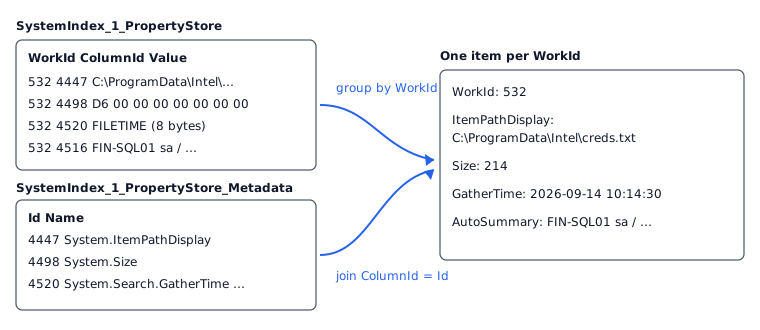
Consequences for analysis:
- You have to pivot. A
SELECT *gives you property soup. Group by WorkId, join the metadata, and turn each ColumnId into a named field. - Values are typed by the metadata, not the column. Public research and the parser's own decoding treat storage type 11 as a string and 12 as an 8-byte little-endian integer or FILETIME. Microsoft does not document the storage-type codes, so a careful parser falls back to guessing for anything else and keeps the raw bytes.
- Mind the table type. A table keyed on (WorkId, ColumnId) can be declared
WITHOUT ROWID, in which case its rows live in an index b-tree rather than a table b-tree. Lightweight SQLite readers that only walk rowid tables would see nothing. The parser handles both. - Folder paths come from the gather database.
SystemIndex_GthrPthis a tree of scope names (Scope, Parent, Name). Rebuild the full folder path by walking parents, then appendFileNamefromSystemIndex_Gthr.
The gather tables are the same idea in both
SystemIndex_Gthr has one row per document the crawler knows: ScopeID, DocumentID, FileName, LastModified, TransactionFlags and more. SystemIndex_GthrPth gives the scope tree. The Stroz Friedberg paper lists those columns for both versions. DocumentID matches the property store's WorkId, which is how you correlate the two.
On Windows 11 they are in a separate file with its own WAL. If you only collected Windows.db, you lose the path reconstruction and, more importantly, the "in the property store but not in the gather table" comparison, which is one of the better indicators of a deleted file.
Recent changes: logs vs WAL
Both engines use write-ahead logging, but the forensic consequences differ.
ESE writes changes to MSS*.log first and applies them to Windows.edb later. A database copied while running is marked dirty shutdown. The latest changes are only in the logs until you replay them with esentutl /r. See fixing a dirty Windows.edb.
SQLite appends committed pages to Windows.db-wal. They are folded into the database at a checkpoint, by default when the WAL reaches 1,000 pages or when the last connection closes, per the SQLite documentation. Readers look at the WAL first. There is no "replay" step for the analyst: a parser that understands the WAL simply reads the newest version of each page. Better, by comparing the database with and without the WAL, you can tell which items were added or changed in the most recent transactions. The Windows Search Index Parser marks items as only in WAL or changed in WAL for that reason. See Windows.db forensics: SQLite and the WAL.
Which one is easier to work with?
For a forensicator, Windows 11 is easier to read and harder to read completely.
- Easier: SQLite is documented and every language has a reader. You can check a parser's output with
sqlite3on a copy in minutes. - Harder: the pivot, the typed blobs, the separate gather database and the WAL all have to be right, and the storage-type codes are not documented.
- ESE is the reverse: a heavier format (catalog, B+-trees, tagged columns, long values, compression), but one self-contained file whose layout is well documented by libesedb.
What the tool does with each
The Windows Search Index Parser handles both in the browser:
- Windows.db: its own SQLite + WAL reader (WITHOUT ROWID aware), pivots
SystemIndex_1_PropertyStoreinto one item per WorkId, joinsWindows-gather.dbon DocumentID, rebuilds folder paths, and marks WAL-only / WAL-changed items. A WAL that belongs to a different database is detected and ignored. The exact Windows 11 DDL is not documented, so the path rebuild and some value decoding follow published research and heuristics. - Windows.edb: its own read-only ESE reader (catalog, B+-trees, fixed / variable / tagged columns, long values, 7-bit and XPRESS compression) that reads
SystemIndex_PropertyStoreand the gather tables. Honest caveat: that reader has so far been validated on synthetic databases only. Treat its output as a lead and confirm key findings with another tool.